An AI video ad works when the first second shows a clear question or claim, every scene has one message and the end has a clear call to action. With a precise prompt, Claude builds such a video in 9:16, 1:1 or 16:9 with crisp type and your brand colours.
A video ad has one second to stand out. After that, the thumb keeps scrolling. This used to mean an agency, storyboards, animation and several feedback rounds. Today you can create a video ad with AI that looks just as clean, in a fraction of the time.
What makes a good video ad
- Hook in the first second: a question or claim that hits your audience. "Still chasing invoices?" beats your logo.
- Show the problem: short, concrete, recognisable.
- The solution in action: your product solving it. For apps, that is the interface in motion.
- The proof: a number, a result, a before and after.
- The call to action: one clear next step.
Many people watch without sound, so the story has to work silently. Big type appearing word by word is ideal, and that is exactly what AI motion design does well.
How to create an AI video ad
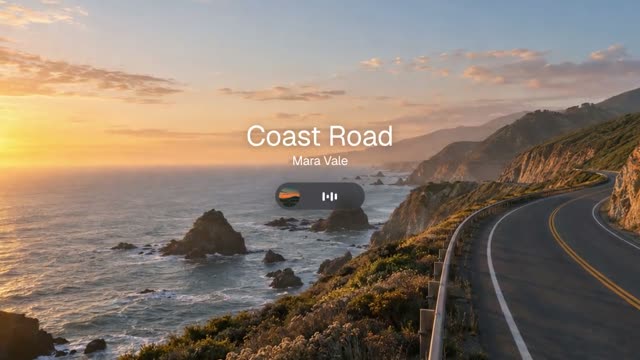
# Tonic – 15-second beat-cut product film for a music app, 16:9, photo plates, glass UI and one coral accent ## 0. What you are building Build a short, unnarrated product film for "Tonic", an invented music-streaming app. It is cut like a music video: every cut, every word and every list row lands on a 120 bpm grid (one beat = 0.5 s = 15
another 17,181 wordsThis is only the start. Our prompts average around 15,500 words: every scene, every movement, every colour is described precisely. That is why your video really turns out like the example.
Get access nowPick a video
You see exactly what you will get.
Copy the prompt
One click. Structure, style and motion are already in there.
Create your own video
Change topic, style and scenes. No experience needed.
- Set goal and format. Reels and TikTok need 9:16, the feed 1:1 or 4:5, YouTube 16:9.
- Pick a matching prompt in the library; you see every example first.
- Insert your hook and copy. Keep every line short.
- Add brand colours and logo as values, not just names.
- Generate in Claude and check it muted. Is the message still clear?
- Export two or three variants with different hooks and let the numbers decide.
Example: an app promo video
"Tonic" above is a 15-second beat-cut product film for a music app: photo plates, glass UI and one coral accent. For your own app promo video, swap name, screens and copy and keep the rhythm. More ideas: "Trim" for a subscription app, or "Dropla" in portrait for creators.
In Reels, TikTok and Shorts, controls sit on top of the video at the top and bottom. Keep text and product in the bright area in the middle.
Mistakes that make ads expensive
- Logo first. Nobody stops for a logo.
- Too much text at once. One sentence per scene.
- Important things at the edges. Reels and TikTok place controls at the top and bottom; keep text and product in the middle.
- No clear call to action.
- Only one variant. With a prompt, a new hook takes minutes.
AI or agency?
For quick tests, regular social ads and products with a clear interface, AI is ideal. For big campaigns with live action or complex 3D, a team is still worth it, and you can hire us for that.
Frequently asked questions
How long should a video ad be?
For Reels and TikTok, 6 to 15 seconds work well. The prompts in the DrillUp library mostly run between 9 and 15 seconds.
Can I use the video for advertising?
Yes. Videos you create with the DrillUp prompts may be used for your own ads and for clients. Make sure music, logos and photos you add are yours or licensed.
Which format do I need?
9:16 for Reels, TikTok and Shorts, 1:1 or 4:5 for the feed, 16:9 for YouTube and websites. Plan the format in the prompt from the start.